
You have just approved a payroll run. The numbers are correct, the deductions check out, and every employee is set to be paid the right amount on Friday. Then comes the part nobody talks about: you close the payroll software, open a separate banking portal, and start re-entering or uploading the very payment details you just finalised.
That gap between finishing payroll and actually moving the money is where things go wrong. A miskeyed sort code, a transposed account number, a batch uploaded to the wrong file field, and a member of staff does not get paid on payday. For a small business owner running this alone, that switch between systems is not just tedious. It is a genuine window of exposure.
Sage has now closed that window. As of 9 September 2026, its Payroll platform includes a built-in Salary Payments feature that lets you finalise a pay run and execute the bank transfer inside a single workflow. It is one example of a wider shift in UK small business infrastructure, where open banking is collapsing the distance between accounting software and payment execution.
Here is exactly how the feature works, what it changes about the payroll process, and the honest limitations you should weigh before deciding whether to switch. By the time you finish this, you will know whether it is relevant to your specific setup.
What Sage Salary Payments actually does (and what problem it solves)
Think about the old sequence for a moment, because the problem is entirely in the steps, not the maths.
You build and approve the pay run in your payroll software. Then you leave that environment entirely. You log into your online banking, re-key or upload each employee’s payment details, and manually authorise the transfers. Every one of those handoffs is a place where an error can creep in, and every one adds time to a task that already happens every single month.
The new process
The feature removes the switching. Instead of moving to a separate banking environment, the platform now triggers salary disbursement directly from a linked business bank account at the point you approve the pay run. There is no re-entering of payment details after approval, because the details never leave the workflow.
Here is the before and after, side by side:
The old process:
- Approve the pay run in payroll software.
- Open a separate online banking portal.
- Re-enter or upload each employee’s payment details.
- Manually authorise the transfers.
The new process:
- Approve the pay run in Sage.
- Authorise the payment within the same platform.
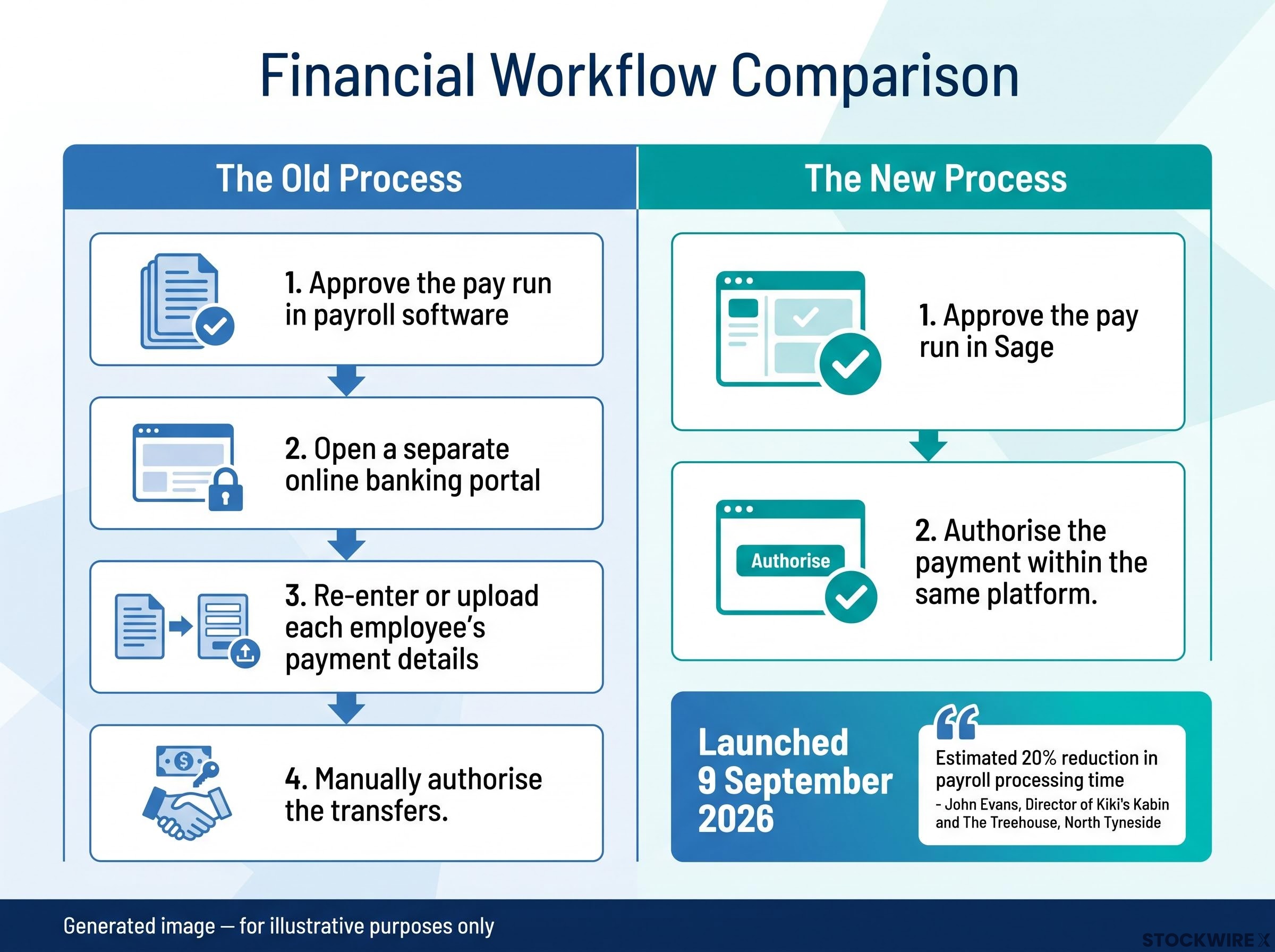
That is the whole change, and its value shows up in real time saved. John Evans, Director and co-owner of Kiki’s Kabin and The Treehouse in North Tyneside, reported an estimated 20% reduction in the time he spends on payroll processing after adopting the tool.
That figure is a single case study, and results will vary with your business size and how complex your current workflow is. But the direction it points is worth reading. For businesses where payroll is a recurring administrative drain rather than a genuinely complex process, this consolidation is a real time-return, not a marginal convenience.
The practical takeaway for you is diagnostic. If your current setup involves logging into a second system every payday and manually keying transfers, you have the same vulnerability this feature is designed to remove. Knowing that is the first step in deciding whether the fix is worth your attention.
When big ASX news breaks, our subscribers know first
How open banking makes the payment initiation work
On screen, the whole thing looks almost anticlimactic. You approve the pay run, confirm the payment, verify it in your banking app, and it is done. The simplicity is the point, but it rests on a specific piece of infrastructure worth understanding.
The mechanism is called a Payment Initiation Service (PIS), a core part of open banking. In plain terms, payments are executed through the provider’s infrastructure rather than via a direct API link to your existing business bank account. The software is the messenger, not the mover.
The security comes from where the approval happens. Strong Customer Authentication (SCA) is the step where you verify the payment inside your own bank’s app or portal, using the same login and checks your bank already requires. This matters because your banking credentials never leave your bank’s environment. No login, no password, and no shared access is ever handed to the payroll software.
That is the structural reason this is meaningfully safer than uploading a Bacs file or keying transfers through a shared banking login. Your bank remains the only party that ever sees your credentials.
The FCA’s regulatory framework for payment initiation services sets out the authorisation and conduct requirements that providers must meet before offering PIS in the UK, which is the layer of oversight sitting behind the simplified in-platform payment experience you see in Sage.
Here is the full sequence:
- The pay run is approved in Sage.
- An API sends the payment request to your bank.
- You authenticate the request in your bank’s app using SCA.
- Faster Payments executes the transfer within minutes.
- The transaction is reconciled back in Sage.
For accountants and bookkeepers running payroll on behalf of clients, that authentication step changes who needs to be available. Someone with access to the client’s bank app has to approve the payment on payday, so your existing client workflow needs to accommodate that person being reachable at the right moment.
One transparency note on the infrastructure. Sage’s existing Salary and Supplier Payments service has been delivered through Modulr since its 2020 launch, and current Sage product documentation continues to describe it as Modulr-powered. Crezco, another open banking provider, has a documented integration with Sage that covers pay-by-bank links on sales invoices, which is accounts receivable, not payroll disbursement. The specific backend behind this new payroll feature is not independently confirmed, so it is worth verifying directly with Sage if it matters to your due diligence.
The wider infrastructure is maturing fast. According to Open Banking Limited’s Impact Report 7, released in January 2026, one in five UK consumers and small businesses are now active open banking users, with small business penetration reaching 18-20%. There were 16.5 million active UK open banking user connections as of December 2025.
Open banking payment transactions reached 351 million in 2025, up 57% year-on-year, according to Open Banking Limited and Whitecap Consulting.
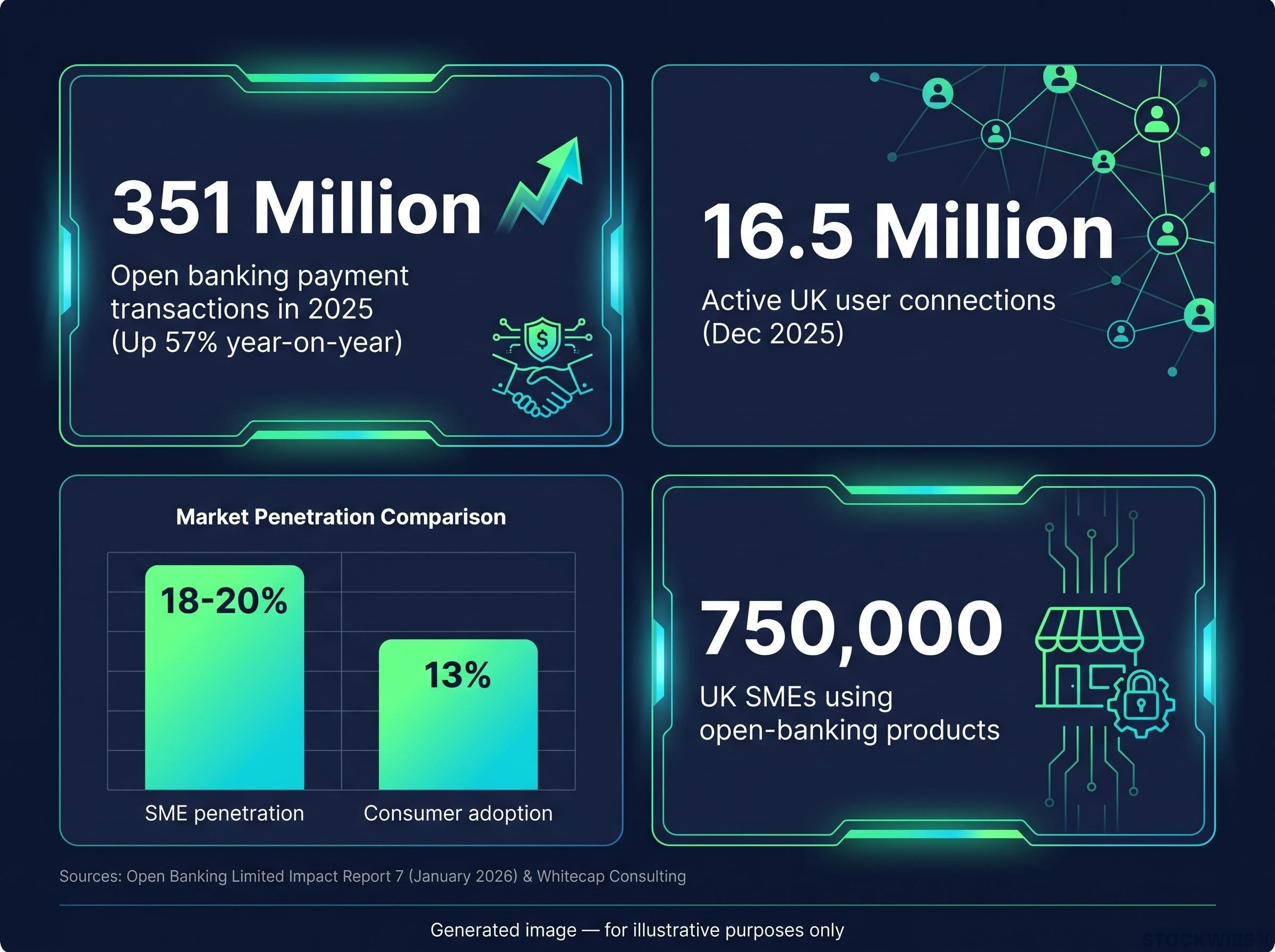
That growth tells you the rails underneath this feature are not experimental. They are carrying serious and rapidly rising volume.
The settlement speed is the other structural difference, and it is best seen against the older method:
| Feature | Faster Payments | Bacs |
|---|---|---|
| Settlement time | Within minutes | 2-3 working days |
| Initiation method | Authenticated API instruction | Batch file upload |
| Reversibility | Cannot be recalled unilaterally once authorised | Can be cancelled before the file processes |
Why this matters specifically for UK small businesses
Understanding the mechanism is one thing. What it changes at your desk on payday is another, and there are three concrete gains worth naming.
The first is cash-flow timing, and it is the one small firms feel most directly. Because Faster Payments settles within minutes rather than the 2-3 working days a Bacs run takes, you can hold funds in your account until the moment payroll actually runs. There is no need to pre-fund a separate account days in advance and watch that money sit idle.
For a business with 10 to 20 employees and a tight month-end position, that difference is not a rounding error. The gap between pre-funding a payroll account on Wednesday and holding those funds until Friday morning is a genuine working capital tool, giving you two extra days of control over your own cash.
The broader context for payroll costs matters here: UK wage growth is forecast to ease to around 4.0% annually, and with the Bank of England holding rates at 3.75%, the macro environment bearing on monthly payroll volumes is shifting in ways that affect how much cash small businesses need to move on payday.
The second gain is automatic reconciliation. Because the payment initiation and the resulting bank transaction share the same data origin, matching salary payments to bank entries happens in real time. You are not sitting with a statement, ticking off each transfer by hand.
The third is structural simplicity. Sage operates via embedded payment accounts that must be funded prior to payday, executing payments through the provider’s infrastructure rather than a direct API link to your existing business bank account. For a business without dedicated finance staff, that removes a whole layer of administrative overhead.
Here are the three benefits at a glance:
- Cash-flow timing: Hold funds in your main account until payday instead of pre-funding days ahead.
- Automatic reconciliation: Salary payments match to bank entries in real time, with no manual checking against statements.
- Simplified workflow: Salary disbursement is managed within the same platform as your payroll approval, with no need to switch to a separate banking portal.
None of this requires you to be an early adopter. At least 750,000 UK SMEs already use open-banking-enabled products, per Open Banking Limited and UK government figures, and business adoption of open banking at 18-20% already runs ahead of consumer adoption at 13%. The operational familiarity is largely there. The question is whether the payment side fits your setup, which is where the limitations come in.
Limitations and gaps to assess before switching
This is not a section about dealbreakers. It is the checklist a sensible owner runs through before changing a payroll process that currently works. Four constraints deserve a straight answer.
The most practically relevant is transaction limits. UK banks impose daily open banking payment limits that typically sit between £100,000 and £250,000, and these are bank-specific and subject to change. If your monthly payroll exceeds that ceiling, you may need to split the run into batches or fall back to Bacs.
Next is bank coverage. Not every UK bank supports the payment initiation APIs this feature relies on, so you cannot assume it is available to you until you check.
Based on Crezco’s published documentation, some UK banks including Co-Op, Metro, and ANNA do not yet fully support open banking payments or standing orders. If your business banks with one of these, verify compatibility before assuming the feature works for you.
Third is reversal complexity. Unlike a Bacs file you can cancel before it processes, an authorised open banking payment cannot be recalled unilaterally. Correcting an error means coordinating with the payment provider or your bank, which has real timing implications if the mistake surfaces after approval.
Fourth is API dependency. The whole flow relies on your bank’s APIs and the aggregator infrastructure being available. If either experiences downtime, salary payments can be delayed, which is a different failure mode from Bacs and one smaller firms should have a contingency for.
Here are the four risks and what to do about each:
| Limitation | Practical implication | Suggested mitigation |
|---|---|---|
| Transaction limits (£100,000-£250,000) | Large payroll runs may exceed the daily cap | Split into batches or revert to Bacs for the overflow |
| Bank coverage gaps | Some banks do not support payment initiation APIs | Confirm your business bank is supported before switching |
| Reversal complexity | Authorised payments cannot be recalled unilaterally | Double-check amounts and recipients before final approval |
| API downtime | Outages can delay salary payments | Keep a Bacs or manual fallback ready for payday |
Worth noting on the technical side: integrating Real Time Information (RTI) reporting and gross-to-net calculations with live payment APIs is significant engineering, and not every payroll platform has solved it. Sage’s integration represents a more mature implementation than a bolt-on would.
The read for you is simple. If your bank is not supported, or your monthly payroll exceeds the daily limit, the headline benefits do not apply to you yet. Better to know that before you start a migration than midway through one.
What this signals about payroll’s direction, and how to decide if it is right for your business now
Step back and Sage’s move fits a pattern. Across UK fintech, accounting, payroll, and payments are converging into single platforms, and this feature is one instance of a trend already visible in Xero’s bill payment integration and Modulr-backed embedded finance models. The direction of travel is toward fewer systems doing more.
The PEXA and NatWest UK platform partnership is another instance of embedded finance integration reshaping legacy professional workflows in the UK, with a major clearing bank now transacting directly inside a digital property platform rather than through separate systems.
So how do you decide? The clearest candidates for immediate benefit are businesses that run payroll manually, use a compatible bank, and have payroll volumes comfortably under their bank’s daily limit. If that is you, the time saved and error risk removed are real and available now.
If your payroll runs are large, your bank is unsupported, or your payroll is handled by a bureau, the honest answer is to verify compatibility first before committing to anything.
Three questions make that assessment concrete:
- Is my business bank supported for open banking payment initiation?
- Does my monthly payroll volume fall within the bank’s daily transaction limit?
- Who in my business needs to be available to authorise the SCA step on payday?
The constraints that might rule this out today are shrinking, not fixed. Open banking payment transactions grew 57% year-on-year in 2025, and with 750,000 UK SMEs already using open-banking-enabled products, the familiarity needed to adopt payment initiation is already widespread. Bank coverage will widen and transaction limits will rise.
That means the calculus on whether to wait or switch now comes down to a single question: how much is your current workflow costing you in time and error risk each month? If the answer is meaningful, and your bank supports it, there is little reason to wait.
For readers wanting to understand the M&A and competitive dynamics driving this convergence at scale, our full explainer on payments platform consolidation examines how Stripe’s $53 billion bid for PayPal illustrates why fewer, larger platforms with combined payment and financial data capabilities are replacing fragmented point solutions.
This article is for informational purposes only and should not be considered financial advice. Investors should conduct their own research and consult with financial professionals before making investment decisions.